Connecting an AI agent to email is a six-layer problem, and most teams only budget for the first two.
The first two layers are connectivity: authenticating with the email provider and syncing messages. Every approach handles these, and they’re typically solved in a few days.
The remaining four layers are where the engineering time actually lives: parsing raw MIME content into clean text, reconstructing threads and removing duplicated quoted text, building contextual intelligence (who said what, what changed, what’s unresolved across threads), and structuring the output so an LLM can reason over it accurately.
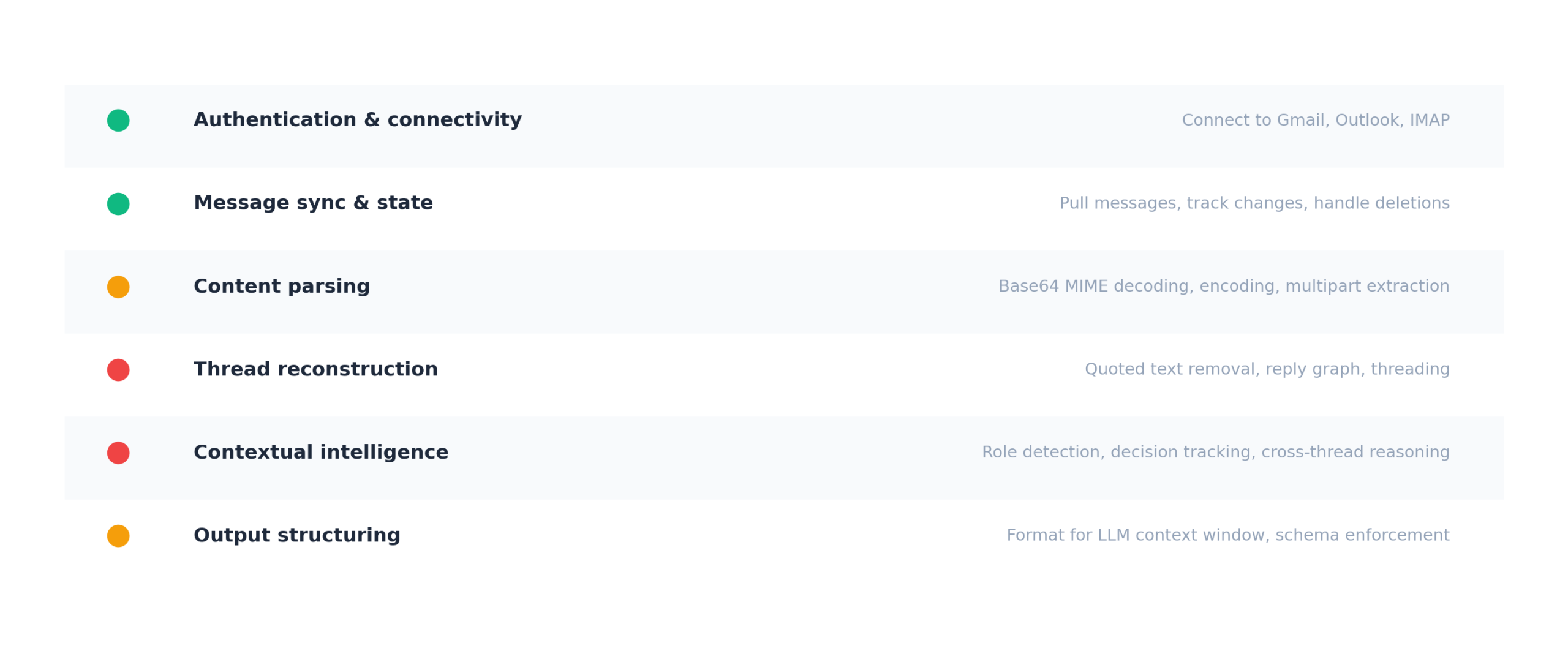
The approach you choose determines which layers you own and which are handled for you. An agent that receives raw email with duplicated quoted text, no speaker attribution, and no temporal ordering will produce different answers than an agent that receives reconstructed conversation data with attribution and citations, even when it’s the same model running the same prompt.
(For how much accuracy changes between raw and reconstructed input, see why RAG fails on email threads.)
Approach 1: Gmail API
Where most teams start if their users are on Google Workspace. The API gives you native threading through threadId, good metadata, and attachment access. A proof of concept runs in an afternoon.
The problems start past the proof of concept. Message bodies arrive as base64-encoded MIME, so you’re parsing multipart structures, handling character encoding issues, and stripping quoted text where the format varies by email client. Threading breaks when someone changes the subject line, when messages arrive from third-party clients with inconsistent headers, or when forwarded messages don’t maintain threading relationships.
For agents, the core issue is what lands in the context window: the full content of every message including signatures, disclaimers, and quoted text from every previous reply, with no reliable speaker attribution.
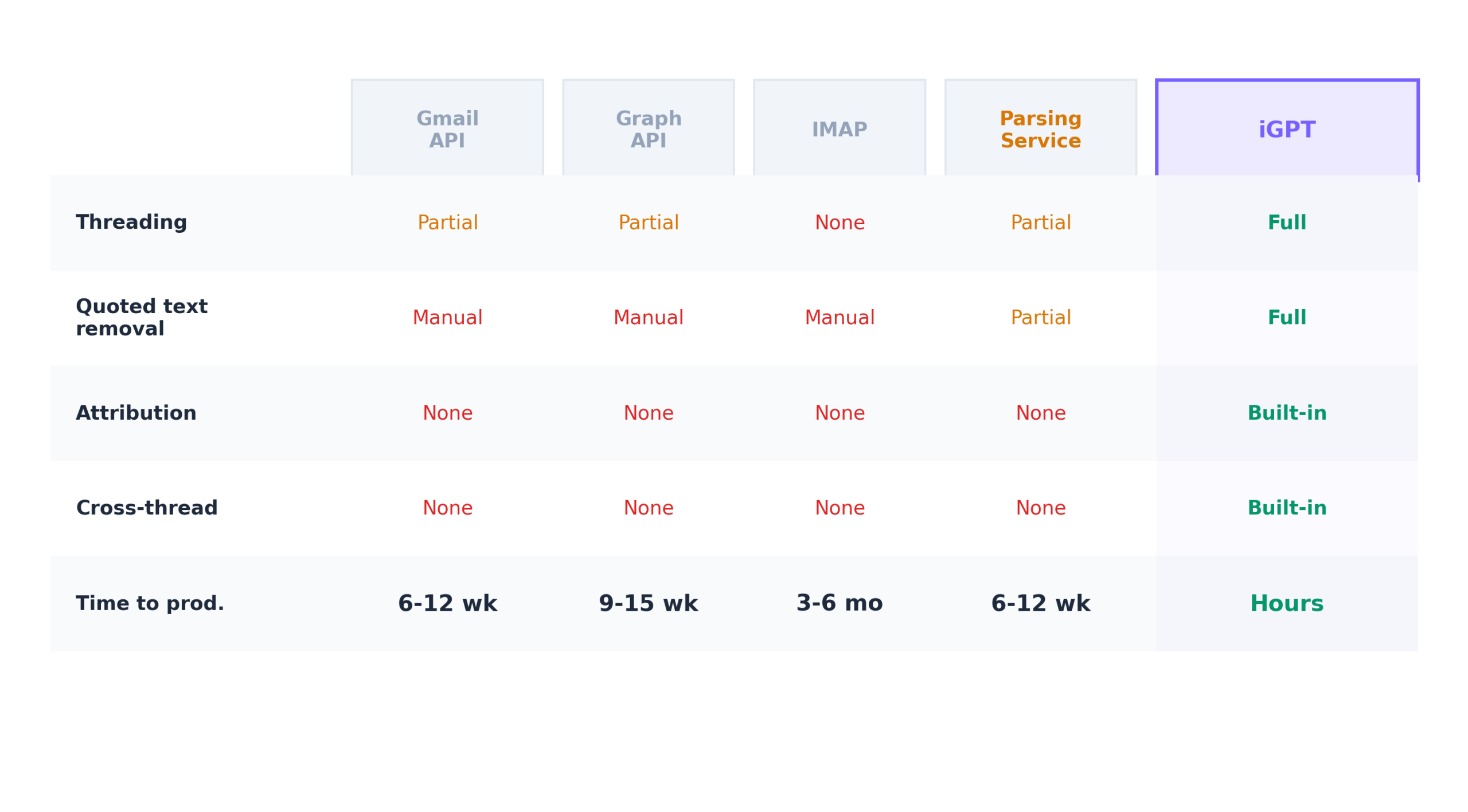
Timeline: 6-12 weeks to production quality.
Approach 2: Microsoft Graph API
The equivalent path for Outlook and Microsoft 365. Graph gives you a conversationId on every message, which sounds like threading but breaks if anyone changes the subject line. Outlook’s quoting conventions vary between desktop, web, and mobile, so you’re writing parsing logic for at least three quoting formats from a single provider. Authentication through Azure AD means tenant registration, app vs. delegated permissions, personal vs. organizational accounts (different flows), and admin consent that varies by org.
Timeline: 9-15 weeks. Longer than Gmail because threading is less reliable and the auth surface is larger.
Approach 3: IMAP
The universal protocol, and sometimes the only option if your application needs to work with Gmail, Outlook, Yahoo, Exchange, and self-hosted systems without separate integrations. IMAP has no native concept of threading. You parse Message-ID, In-Reply-To, and References headers from every message and build threading yourself. Content arrives as raw RFC 5322 MIME. Every new provider reveals new edge cases: servers that truncate References headers, clients that don’t set In-Reply-To, mail gateways that rewrite message IDs.
Timeline: 3-6 months. Consistently takes longer than the estimate.
Approach 4: Third-party parsing services
Services like EmailEngine and Nylas abstract away protocol differences and return normalized data. They handle OAuth, provider normalization, sync state, and basic content extraction. They’re a legitimate shortcut for the connectivity and parsing layers.
The limitation is architectural: these services solve the connection problem but stop where understanding begins. Quoted text handling is partial. Anything involving cross-thread reasoning, role detection, or commitment tracking is still yours to build.
Timeline: 6-12 weeks. Faster to connectivity, but the same timeline as Gmail API for the intelligence layers.
Approach 5: Structured email context API (iGPT)
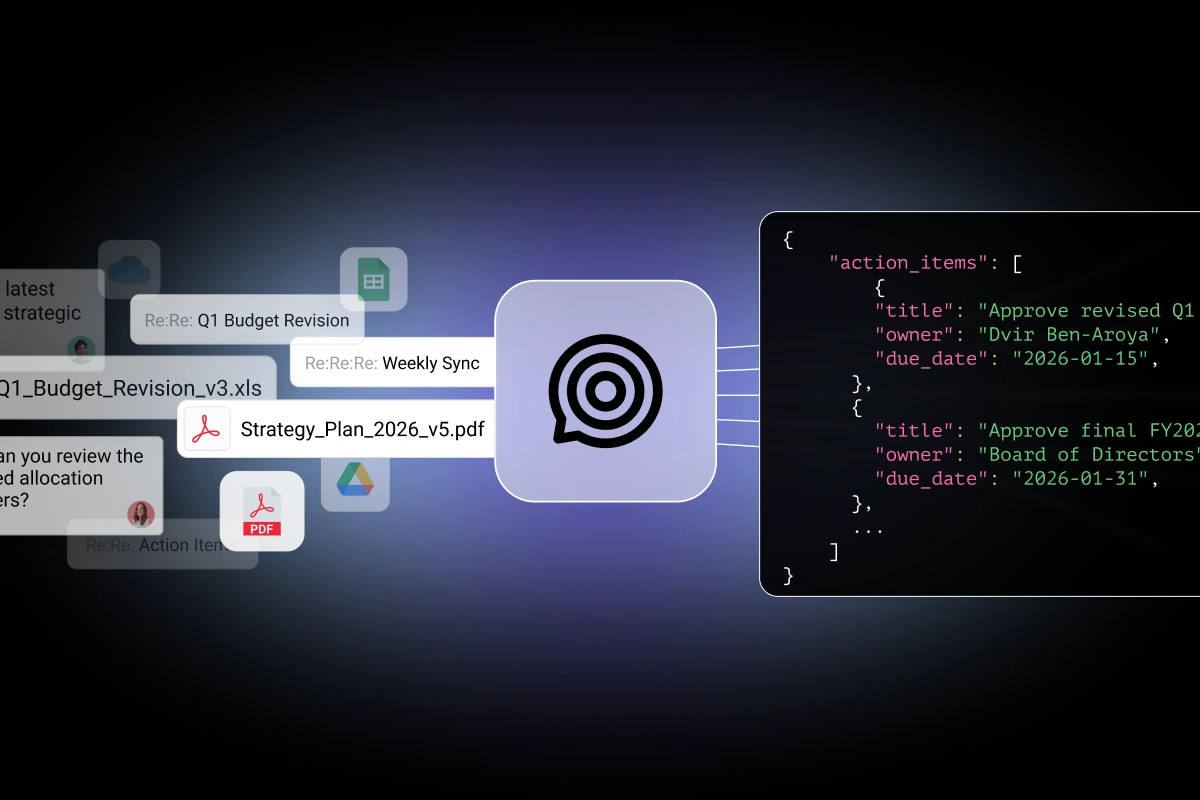
Instead of returning email content for your agent to interpret, this approach returns structured output: the answer to your query with participants identified, decisions attributed to specific people, citations pointing to specific messages, and the current state of the conversation.
All six layers from provider connectivity through structured output are collapsed into one call. The tradeoffs are real: you’re adding a dependency on a third-party service for a critical data path, and you have less control over parsing behavior if your use case involves unusual email formats.
Here’s what the output looks like:
{
  "question": "What commitments are overdue on the Northstar deal?",
  "answer": {
    "overdue_commitments": [
      {
        "commitment": "Send revised SOW with updated payment terms",
        "owned_by": "us",
        "promised_on": "2026-02-15",
        "days_overdue": 23,
        "source": "Re: Northstar Contract Review (msg_19c7a, Feb 15)"
      }
    ],
    "waiting_on_them": [
      {
        "item": "Legal review of data processing agreement",
        "requested_on": "2026-02-22",
        "days_waiting": 16,
        "last_contact": "David Park, VP Engineering"
      }
    ]
  }
}
Every field traced to a specific message. Commitments matched against follow-through. What’s overdue from your side and what’s waiting on theirs, distinguished automatically from the thread structure.
Timeline: Hours to days.
How the five approaches compare
Which approach fits
Approaches 1-3 make sense when your use case is simple (finding messages by sender or date), when email parsing is your core product, or when you have an engineer who has built this before and knows the real scope.
Approach 4 makes sense when you need multi-provider support without building it yourself and your primary need is clean email access rather than conversational understanding.
Approach 5 makes sense when your agent needs to reason about conversations (who committed to what, what changed, what’s unresolved), when you need production accuracy faster than six months, and when email intelligence is a feature inside your product rather than the product itself.
iGPT handles all six layers through a single API call. Try it on your own email data at igpt.ai/hub/playground. For the engineering scope of building layers 3-6 in-house, see build vs. buy email context for AI agents.